
SitterStack Pro · for independent pet sitters
See what's missing before every booking.
Every client, pet, booking, care plan and payment in one Excel workbook, plus 43 ready-to-use forms. For pet sitters, dog walkers and home boarders.
- Excel workbook + 43 Word and PDF forms
- $49 once, no subscription
- A download you own, not an app
 (opens full size)
What you're buying
A toolkit you download and own
SitterStack Pro is a set of files. It is not an app: there is no online booking, client portal, payment processing, texts or reminders. You record what happens; the workbook calculates, checks and warns.
One Excel workbook
22 tabs for clients, pets, bookings, care plans and money. Start with four: Clients, Pets, Bookings, Payments.
43 ready-to-use forms
Each as an editable Word file and a print-ready PDF, organized by task.
Guides and worked examples
A five-step Start Here, plain-English guides and three fully worked fictional example businesses.
How it works
Your first printed care plan, in five steps
The same five steps the Start Here guide walks you through. Real views from the delivered workbook, filled in with one of the three fictional example businesses.
-
Open Start Here
A five-step guide to your first printed care plan, plus your licence, disclaimer, privacy and support notes. Download the ZIP on a computer, extract it, open README_START_HERE.txt, then Start_Here.pdf.
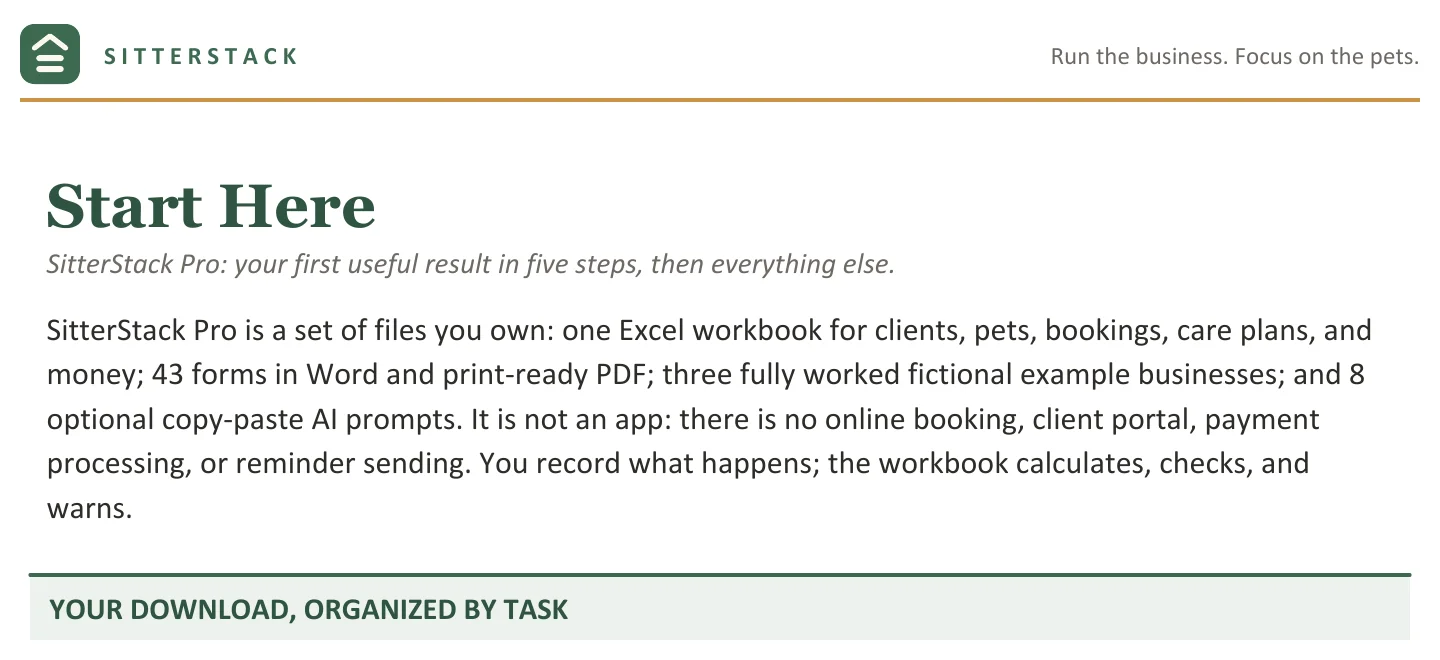
Start_Here.pdf, page 1: “your first useful result in five steps, then everything else.” Tap to enlarge. -
Make your working copy and set your prices
Work in a copy of the clean workbook, so a fresh start is always one file-copy away. Type your business name and your own service prices.
Add a client, a pet and a booking
Every client, pet and booking sits in one place, linked by ID.
-
Check Readiness
Each booking names what's still missing: a client or pet that isn't on file, a date typed as words, an unconfirmed meet-and-greet, care plan or emergency info. A Schedule Check also flags overlapping bookings.
(opens full size)
Fictional example data. Tap to enlarge. -
Print the care plan
Pick a booking and a pet, and the Care Plan page pulls together what you've recorded. Every blank field is shaded and named in the status line, so you know what to ask the owner. A care plan a backup sitter can follow.
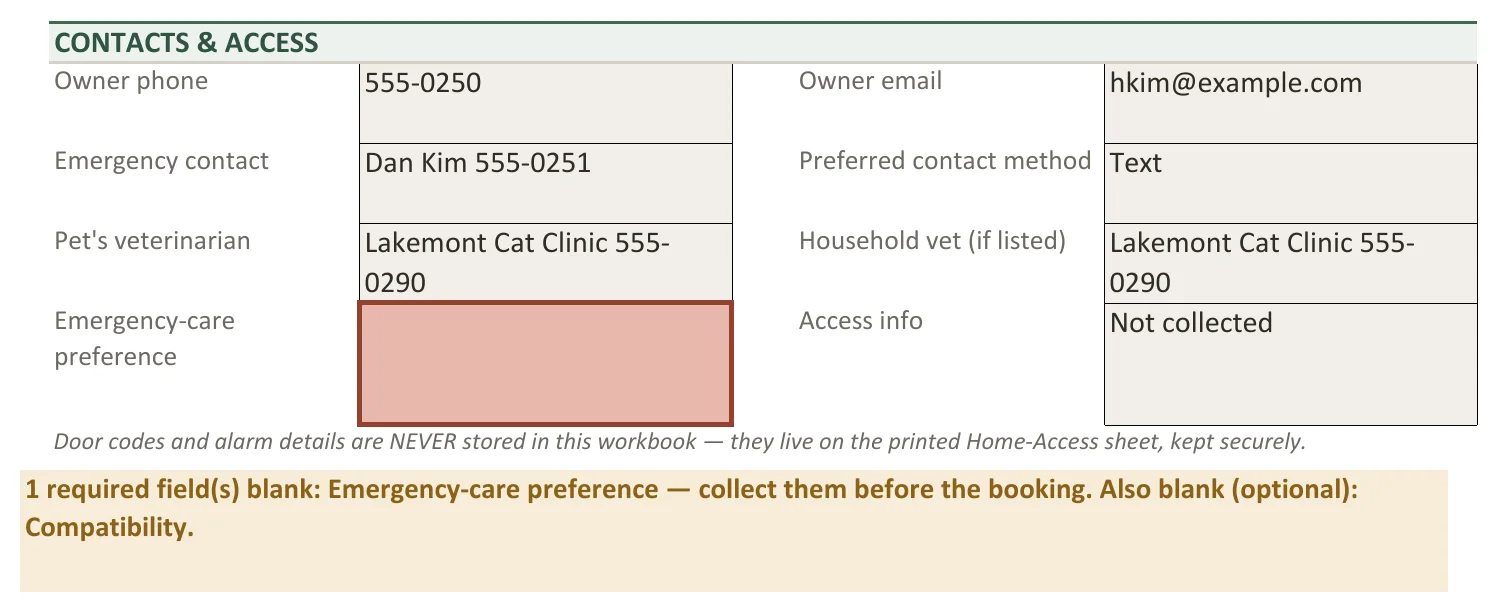
Fictional example data. Tap to enlarge.
Then the business side
Payments, prices and capacity
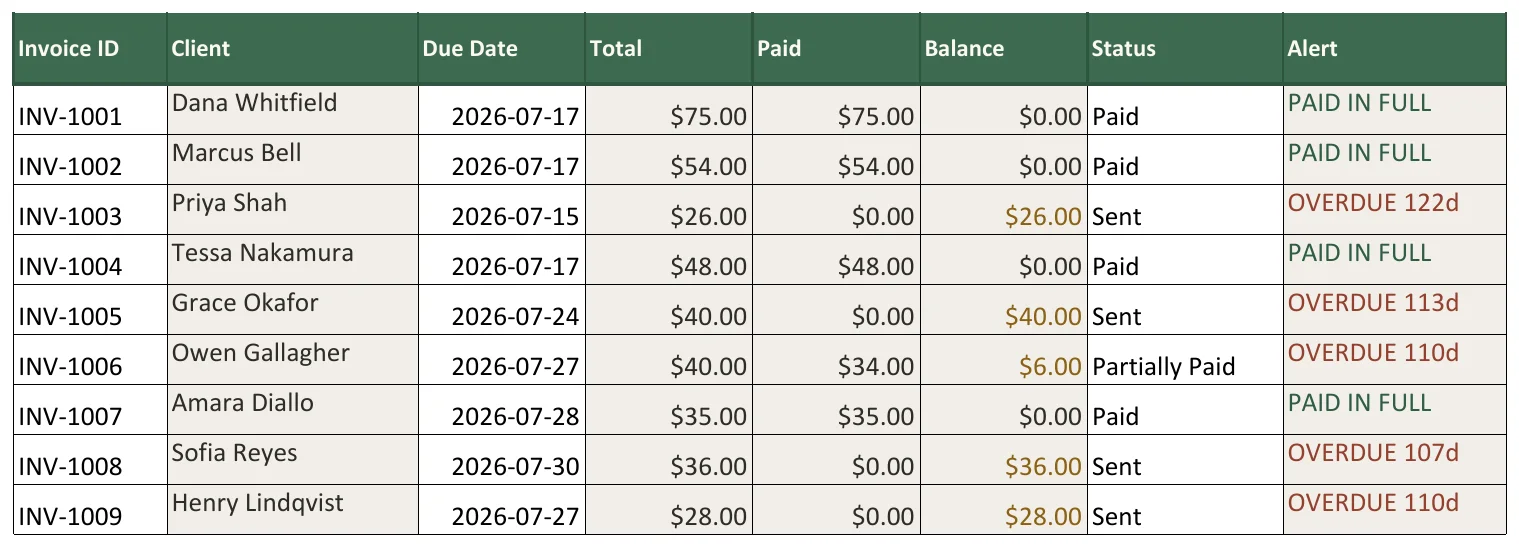
Know who has paid, who is overdue, and by how many days
Invoices and payments in one place. The Alert column shows PAID IN FULL, open, OVERDUE with the number of days, or OVERPAID with the amount to refund.
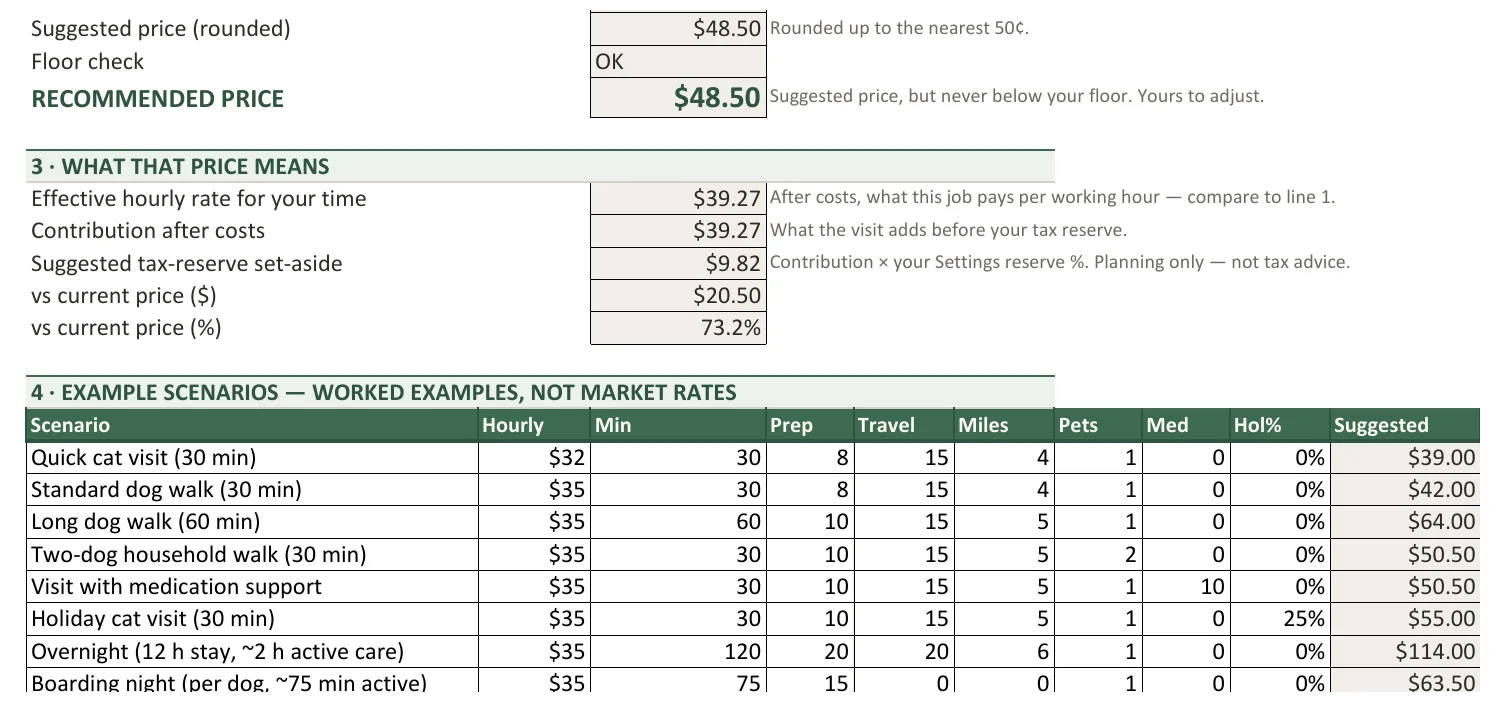
Price from your real time, travel and costs
The Pricing Calculator builds a price from your time, travel and costs, never below your minimum, with worked example scenarios.
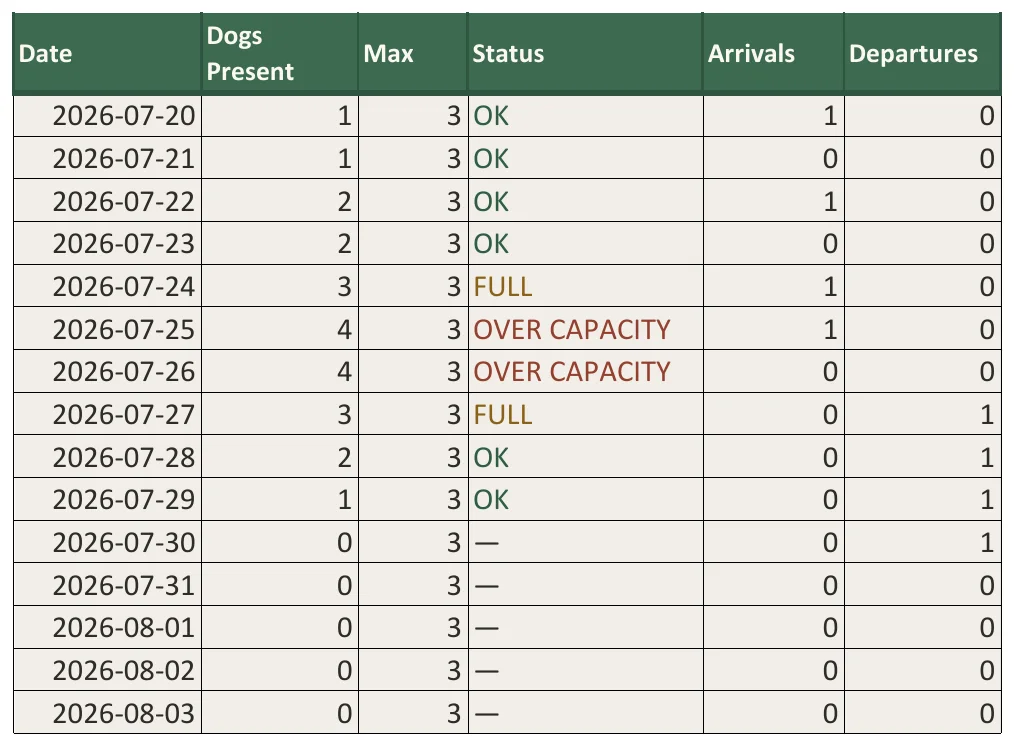
See full and over-capacity days before you accept a stay
For home boarders: the next 45 days against your house maximum, with FULL and OVER CAPACITY days called out.
Medication, exactly as written
Recorded as the owner or vet wrote it. Nothing in SitterStack, including the optional AI prompts, calculates or suggests a dose.
A Dashboard of 28 cards
Plus 4 charts, each card naming the tab where you fix a number.
What's included
The essentials first
The workbook
22 tabs, one file. Start with four tabs: Clients, Pets, Bookings, Payments.
43 forms
Each as an editable Word (DOCX) file and a print-ready PDF. The PDFs are for printing, not fillable. They're organized in four task folders:
- My Clients
- My Bookings
- Pet Care
- My Business
Start Here
Five steps to your first printed care plan.
 (opens full size)
Then the deeper toolkit, when you want it
3 example businesses
Fully worked and labeled fictional: a solo dog walker, a vacation cat sitter and a home dog boarder, with study guides.
8 optional AI prompts
Copy-paste prompts for an assistant you already use, with privacy rules (no door or alarm codes) and anti-fabrication rules (use only your inputs).
Plain-English guides
Spreadsheet reference, forms reference, troubleshooting, privacy, FAQ and your first seven days.
The paperwork
Your licence, plus disclaimer, privacy and support notes.
Who it's for
Made for independent pet-care businesses
A good fit if you are
- an independent pet sitter, dog walker or home boarder
- a Rover sitter building an independent client base (SitterStack is not affiliated with Rover)
- happy working in Excel on a computer (tested on Windows)
Not a fit if you want
- an app with online booking, a client portal or payment processing
- automatic texts or reminders
- something tested on a Mac or in Google Sheets
SitterStack Pro
$49 one-time
One purchase, no subscription: an Excel workbook and 43 forms you own.
Buy SitterStack Pro on GumroadCheckout through Gumroad. Gumroad emails your receipt with the download link; it's also in your Gumroad Library.
- 22-tab Excel workbook
- 43 forms, Word + print-ready PDF
- 3 worked example businesses
- 8 optional AI prompts
- Start Here + plain-English guides
- 7-day limited refund policy
Before you buy
The details, plainly
Requirements
Microsoft Excel 2019 or newer / Microsoft 365. Tested in Microsoft 365 Excel on Windows; not tested on a Mac. Google Sheets and LibreOffice can import the workbook, but behavior may differ. Keep an untouched backup. The Word and PDF forms work without the spreadsheet. No macros, nothing to install.
Honest limits
Not an app: no online booking, client portal, payment processing, texts or reminders. No dose calculation or medical guidance, ever. Policy and authorization templates are educational drafts: have them reviewed for your area. Not veterinary, legal, tax, accounting or insurance advice.
Refunds
7-day limited refund policy: a refund is available within 7 calendar days when the files are corrupted, stay inaccessible after troubleshooting, or are materially different from the product page. Full terms are on the Gumroad page.
Support
After you buy: reply to your Gumroad receipt or message through Gumroad, with the tab or filename and a screenshot with private details removed. Support covers the product itself, not custom spreadsheet work or business, legal, tax or veterinary advice. Questions before you buy: carlos@moraleslabs.com.
Licence
One pet-care business. Edit everything. Please don't resell or share the files.
Who sells it
SitterStack is a Morales Labs product, sold through Gumroad. It was made with AI-assisted tools under the seller's direction; the files, formulas and examples were reviewed before publication. There are no reviews yet.
FAQ
Questions
How do the files work?
You download one ZIP. Inside are an Excel workbook you work in, 43 forms in four task folders (each as Word and PDF), the Start Here guide, three example workbooks and the guides. Make a copy of the clean workbook and work in the copy; the original stays clean.
Which version of Excel do I need?
Microsoft Excel 2019 or newer, or Microsoft 365. It's tested in Microsoft 365 Excel on Windows. No macros, nothing to install.
Does it work on a Mac or in Google Sheets?
It hasn't been tested on a Mac. Google Sheets and LibreOffice can import the workbook, but behavior may differ, so keep an untouched backup. The Word and PDF forms work without the spreadsheet.
Can I edit the forms?
Yes. Every form comes as an editable Word (DOCX) file. The matching PDFs are print-ready for writing by hand; they are not fillable PDFs.
How do I get the files after I buy?
Gumroad emails your receipt with the download link; it's also in your Gumroad Library. Download the ZIP on a computer, extract it, open README_START_HERE.txt, then Start_Here.pdf.
Is this an app or a subscription?
Neither. It's a one-time purchase of files you keep: no accounts, no online booking, no reminders.
Do I need the AI prompts?
No. They're optional copy-paste prompts for an assistant you already use. They never calculate or suggest a medication dose.
What if something doesn't work?
Reply to your Gumroad receipt or message through Gumroad. Under the 7-day limited refund policy, a refund is available within 7 calendar days when the files are corrupted, stay inaccessible after troubleshooting, or are materially different from the product page.
Can I share it with another sitter?
The licence covers one pet-care business. Edit everything, but please don't resell or share the files.
Where is my data kept?
In your own files, on your computer or wherever you choose to keep them. If you keep them in a cloud drive, that provider's terms apply. This website itself uses no cookies or analytics.